Best AI Tools to Turn a Flat Lay Clothing Photo into an On-Model Photo (2026): Photoroom vs Photta vs Botika vs OnModel
Photoroom and Photta are listed first by our choice, not as the result of a test. How we write these lists
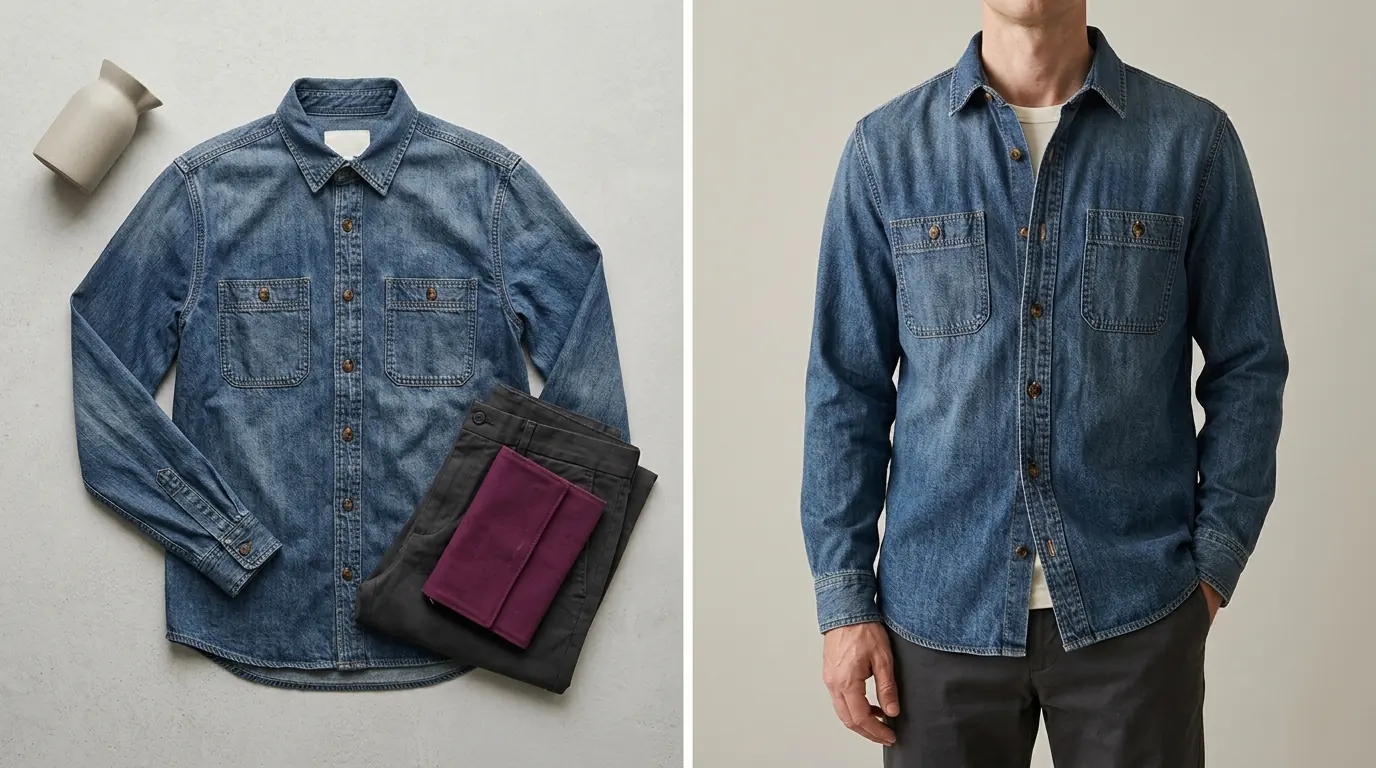
The best AI tool for flat lay to model photos depends on who should wear the garment and how many products you have. Photoroom suits sellers already editing in its app: AI Fashion Models puts a simple flat lay on a preset or uploaded model, from $12.99 a month. Photta's Flat Lay to Model tool dresses a flat lay onto a catalogue model, a model you make or your own model photo, adds the back view from a back photo, and costs about $0.21 to $0.32 a photo on plans from $19 a month. Pick Uwear to pay per photo, CatalogX for a low monthly plan, Caimera for bulk runs of 100+ garments, and OnModel for T-shirts and basic tops. Facts were read on each vendor's own pages on 15 November 2026 or 18 November 2026.
The list comes from each vendor's own pages and includes only tools that name a flat lay as input. Photoroom and Photta are listed first and second by this site's own choice, not as the result of a test; the order of the others is not a ranking. Photta's entry follows the same rule. Botika, listed last, has its own flat lay to model flow.
Key takeaways
- A flat lay has no body in it. Every tool here redraws the garment, so drape, fit and length are generated.
- Cost per photo runs from about $0.01 to about $1.29. Photoroom is $0.01 at 1K on Pro, Claid $0.07 to $0.12, Photta $0.21 to $0.32, Caimera $1.17 to $1.29.
- A back view needs a back photo. Photta and CatalogX make the back from one; Uwear calls a back made without one a guess.
- Vendors disagree in writing about detail. WearView, Modelia and On-Model state details are preserved; Snappyit, Caimera and Uwear say to review each result.
Contents
- Photoroom vs Photta vs Botika vs OnModel for flat lay to model photos
- Why flat lay to model photos are a redraw you must check
- The 15 best AI tools for flat lay to model photos
- How to check flat lay to model photos before you publish
- Which AI tool for flat lay to model photos fits your shop
- FAQ: AI tools for flat lay to model photos
- Sources for this comparison of flat lay to model photos tools
- Profiles of the tools in this list
Photoroom vs Photta vs Botika vs OnModel for flat lay to model photos
| Tool | Best for | What happens to the garment | Starts from | Free start |
|---|---|---|---|---|
| Photoroom | Use inside a photo editor | Generated; checks stated | $12.99 a month (Pro) | Free plan without AI Fashion Models |
| Photta | Catalogue, custom or own model; back view | Redrawn; fit and length can be set | $19 a month, or a $12 one-time pack | 4 photos, no card, watermarked |
| Uwear | No subscription | Redrawn; optional AI reviewer | $7 minimum purchase | No free plan; emailed preview |
| CatalogX | Low plan price | Stated to match; reviewer re-shoots drift | $9.99 a month | 5 photos, no card |
| Caimera | Bulk runs of 100+ garments | Review advised | $15 per user a month | About 2 images, watermarked |
| Modelia | Front or back view setting | Stated as retained; review advised | $30 a month | Free plan, watermarked |
| WearView | A paid fix for one detail | Stated as preserved | $29 a month | No free plan listed |
| On-Model | A free monthly allowance | Stated as "pixel-perfect" | €19 a month | 25 images a month, watermarked |
| Snappyit | Phone apps and Shopify | FAQ says details can change | $12.9 a month | 6 free units, no card |
| GreenOnion | Marketplace sellers, no prompts | Check fine details | $19 a month | Previews only |
| Fotor | Users of a general editor | Complex items may need retries | $8.99 a month | Number not stated |
| Claid | Front and back photos | Generated, "anchored on your product" | $15 a month ($9 yearly) | 50 credits, about 12 images |
| Pixelcut | Tops, in a photo editor | Generated; detail not stated | $10 a month (Pro) | $0 plan; allowance not stated |
| OnModel | T-shirts, basic tops | AI "hallucinates" the image | Not stated | 50 model swaps |
| Botika | Phone or supplier flat lays | Carried over; fine detail can warp | $25 a month | 7-day trial, 300 credits |
Why flat lay to model photos are a redraw you must check
A flat lay records print, colour and outline but no body, so the tool generates how the fabric hangs and where the hem ends. Uwear says small lettering, logos, dense prints, sheer fabric and exact colour fail most.
A front flat lay shows nothing of the back, so a back view from it alone is invented. See also AI fashion model generators and mannequin to model photo tools.
The 15 best AI tools for flat lay to model photos
1. Photoroom: flat lay to model photos inside a photo editor
Photoroom's AI Fashion Models tool (Virtual Model) names "simple flat lays" as an input, and its try-on page adds hanger and ghost mannequin shots, on models across body types, poses and scenes. You pick a preset or uploaded model, pose, background, quality and size, plus an optional prompt.
- What happens to the garment: Redrawn: the help centre says the image is generated from the source image, the chosen settings and a prompt. The try-on page says every render is checked against the original garment for colour, print and detail. A back view from a back photo is not stated.
- Price: AI Fashion Models is on Pro and up: Pro $12.99 a month ($89.99 a year) at 1K, Max $34.99 ($250 a year) adds 2K and Ultra $99 ($990 a year) adds 4K (US prices; the page shows local prices by country). By our arithmetic that is about $0.01 an image at 1K, $0.19 at 2K and $0.32 at 4K.
- Free start: The Free plan gives 100 exports a month for personal, non-commercial use and does not include AI Fashion Models. A 7-day free trial comes with yearly Pro and Max only.
- Not for: Sellers who need 2K or 4K on the cheapest paid plan, or on-model photos on the Free plan.
2. Photta: flat lay to model photos on a catalogue, custom or own model
Photta is an AI product photography studio for online sellers. Photta's Flat Lay to Model tool takes up to three photos of each garment (front, back and a close detail) and returns it worn by a model at 2K or 4K (4K needs the Seller plan or above). The seller picks catalogue models, a Model Maker model or an own model photo, then the fit and length, a background colour or scene, and shoes or accessories; the developer API is on every plan.
- What happens to the garment: The print, colours, buttons and labels are taken from your photo and the garment is redrawn on the model, not pasted. You can say how it should sit and where it ends; left alone, it follows the photo. With a back photo you also get the back view. Compare prints, logos, seams, colour and length with the real garment.
- Price: Plans run from $19 to $369 a month, about $0.21 to $0.32 a photo by our arithmetic; Seller is $49 a month. Without a plan, a one-time pack of 50 for $12 (about 10 on-model photos) or 100 for $20 (about 20) never expires.
- Free start: Free to try with no card, enough for 4 on-model photos. Photos made before paying carry a Photta watermark.
- Not for: A pixel-exact cut-out of the garment, or a live try-on for shoppers (that is the separate Photta Business widget).
3. Uwear: flat lay to model photos paid per photo, with no subscription
Uwear turns a flat lay, packshot or ghost mannequin photo into on-model photos with a saved model and art direction.
- What happens to the garment: Redrawn, with an optional AI reviewer that retries weak results; a back with no back photo is a guess.
- Price: Pay as you go ($7 minimum); a default-model photo is $0.30 at 1K, $0.50 at 2K and $1.00 at 4K; purchases never expire.
- Free start: No free plan; Uwear emails photos of three products from a store link.
- Not for: Sellers who want to try before paying.
4. CatalogX: low-cost flat lay to model photos for marketplace sellers
CatalogX puts an uploaded flat lay on a chosen model, up to 20 garments a batch on every plan.
- What happens to the garment: It says the garment matches the photo; an AI reviewer checks each result and Quality mode re-shoots drift free. A back view needs a back photo.
- Price: $9.99 a month for 30 photos to $149.99 for 900, about $0.17 to $0.33 a photo.
- Free start: 5 free photos on signup, no card.
- Not for: Sellers who need 2K or an own model below Pro.
5. Caimera: flat lay to model photos in bulk for catalogue teams
Caimera's Flatlay to Catalog turns flat lay, ghost mannequin or studio photos into on-model images, 100+ garments per run.
- What happens to the garment: It advises reviewing outputs, especially complex garments.
- Price: $15 to $117 per user a month for about 12 to 100 catalogue images, about $1.17 to $1.29 a photo.
- Free start: A free plan, no card: about 2 catalogue images at 1K, watermarked.
- Not for: Small shops watching cost per photo.
6. Modelia: flat lay to model photos with a front or back view setting
Modelia's Flatlay to Model tool takes flat-lay or ghost mannequin shots; its FAQ describes a Front or Back view setting.
- What happens to the garment: Its page states textures, patterns and details are retained, and advises reviewing results.
- Price: Creator $30 a month for about 50 standard images, about $0.60 a photo ($0.45 with top-up packs).
- Free start: A free Starter plan, watermarked and without commercial rights.
- Not for: Sellers who want to publish free results.
7. WearView: flat lay to model photos with a paid fix for one detail
WearView's flat-lay-to-model page also takes hanger and ghost mannequin photos.
- What happens to the garment: Its FAQ states prints, textures, logos and colours are preserved and drape and fit match; pricing lists a low-cost "fix a detail" edit.
- Price: $29 to $99 a month; an HD photo is about $0.40 to $1.16, more at 2K and 4K.
- Free start: No free plan listed; pricing mentions free sample shoots.
- Not for: Sellers who want a free trial on their own garment.
8. On-Model: flat lay to model photos with a free monthly allowance
On-Model, by PiktID, has a Flat-to-Model tool that prefers clean flat-lay or packshot-style photos.
- What happens to the garment: It states clothing stays "pixel-perfect" and sells Detail Repair for a logo, text or small detail.
- Price: In euros: Basic €19 a month for up to 40 images at 1K, about €0.48 an image; Pro from €89 a month billed annually (monthly not readable).
- Free start: Up to 25 images a month free, no card; watermarked, personal use only.
- Not for: Sellers who need every price in plain view.
9. Snappyit: flat lay to model photos from a phone app or Shopify
Snappyit (browser, iOS, Android, Shopify) has a Fashion Model tool for flat lay, hanger and ghost mannequin photos, with your own model photo as a template.
- What happens to the garment: Its headline claims accurate details; its FAQ says AI can change or misread them.
- Price: From $12.9 a month; what one Fashion Model image uses is not stated.
- Free start: 6 free units for new users, no card.
- Not for: Sellers who need a known cost per photo, or batch runs below Pro.
10. GreenOnion: flat lay to model photos for Amazon, Etsy and Shopify sellers
GreenOnion turns a flat lay, mannequin, hanger or listing photo into on-model images without prompts; up to five reference photos cover the back or details.
- What happens to the garment: It says visible details are kept and advises checking seams, buttons, embroidery and pattern scale.
- Price: $19 a month for 60 images at 2K to $149 for 600, about $0.25 to $0.32 a photo; 4K costs double.
- Free start: A free signup allowance, no card; watermarked previews you cannot download.
- Not for: Sellers who want to use free results.
11. Fotor: a flat lay to model photo inside a general photo editor
Fotor, an online editor, has a Flatlay to Model page with preset or uploaded models.
- What happens to the garment: Its FAQ says accuracy is generally high for standard apparel; layered outfits or unusual textures may need retries.
- Price: $8.99 to $29.99 a month; the flat-lay tool's cost per image is not stated.
- Free start: A free Basic plan; the allowance is not stated.
- Not for: Sellers who need a known cost per photo, or bulk on-model images.
12. Claid: flat lay to model photos from front and back shots
Claid's Flatlay-to-Model page turns flat-lay or ghost mannequin shots into on-model images, from front and back uploads plus other outfit items, on a library or own model.
- What happens to the garment: Generated: Claid says the output "isn't a pixel-perfect copy-paste" but is anchored on your product.
- Price: Essentials $15 a month ($9 yearly), Pro $49 ($35 yearly), about $0.07 to $0.12 a standard image by our arithmetic; 4K needs Pro.
- Free start: A free trial with 50 credits, about 12 fashion images; card and watermark not stated.
- Not for: Sellers who need 4K or batch processing below Pro.
13. Pixelcut: flat lay to model photos of tops inside a photo editor
Pixelcut's Virtual Try-On fits a clothing photo onto a library or uploaded model; its example shows a shirt "shown flat, then AI-generated on a male model". Tops only for now; pants, dresses and accessories are "coming soon".
- What happens to the garment: Generated on the model; detail retention is not stated.
- Price: Pro $10 a month ($8 yearly) for 600 AI credits, Business from $30; the try-on's plan and credit cost are not stated. The Try-On API is $0.10 an image.
- Free start: A $0 plan with no AI credits listed.
- Not for: Sellers of trousers or dresses, or who need a known cost per photo.
14. OnModel: flat lay to model photos of T-shirts and basic tops
OnModel.ai by Trendage, a different vendor from PiktID's On-Model above, has Tshirt to Model in its web and Shopify apps: a flat lay or ghost mannequin photo of a T-shirt or basic top becomes a model photo, front poses only.
- What happens to the garment: Its FAQ says the AI "hallucinates" the image and advises making 3 to 5 per photo.
- Price: Not stated on its pages; only a paid Plus Plan is named.
- Free start: 50 free model swaps (blog); free Tshirt to Model use not stated.
- Not for: Sellers of other garments, or who need back views or a stated price.
15. Botika: flat lay to model photos from phone or supplier shots
Botika's flat lay tool puts a flat lay on a chosen model, pose and background; phone or supplier photos are fine, it says.
- What happens to the garment: Botika says texture, pattern and fit carry over, but its explainer says lace, small hardware and printed text can soften or warp and hems can change length.
- Price: $25 a month (840 credits) to $100 (4,000), 20% less yearly; a Standard 2K photo is 30 credits, about $0.75 to $0.89 monthly ($0.60 to $0.71 yearly).
- Free start: A 7-day trial with 300 credits (about 10 Standard photos); its FAQ gives smaller figures and mentions watermarks.
- Not for: Sellers who want a custom model on a monthly plan (offered on annual managed plans or Enterprise).
How to check flat lay to model photos before you publish
| Check | What to compare |
|---|---|
| Print and pattern | Placement, scale and repeat |
| Logos and lettering | Spelling, size and position |
| Length and fit | Where the hem and sleeves end |
| Hardware and seams | Buttons, zips, pockets, stitching |
| Back view | Made from a back photo, or remove it |
Which AI tool for flat lay to model photos fits your shop
- You want flat lay to model photos inside a photo editor: use Photoroom.
- You want your own model and a back view: use Photta or CatalogX.
- You want no subscription: use Uwear, or a one-time pack from Photta.
- You have hundreds of garments per drop: use Caimera or Uwear.
- You want the lowest listed cost per photo: use Photoroom at 1K, Claid, CatalogX or Photta.
- You work from a phone or inside Shopify: use Snappyit.
FAQ: AI tools for flat lay to model photos
What is the best AI tool for flat lay to model photos?
It depends on the model you need and your volume. Photoroom works inside its editor from $12.99 a month; Photta offers a catalogue, custom or own model and a back view at about $0.21 to $0.32 a photo.
Can AI make flat lay to model photos that match the real garment?
It can come close, but the garment is redrawn, and Uwear, Snappyit and Caimera tell sellers to review details. Compare prints, logos, colour and length.
How much do flat lay to model photos cost?
From about $0.01 (Photoroom at 1K on Pro) to about $1.29 (Caimera) a photo by our arithmetic, with Photta at about $0.21 to $0.32. Snappyit, Fotor and Pixelcut do not state what one photo uses, and OnModel states no price.
Will AI change the fit or length of a garment in a flat lay to model photo?
It can, because a flat lay shows no body. Photta lets you set fit and length, and otherwise follows the photo.
Can I get a back view in flat lay to model photos?
Yes, if you supply a back photo. Photta and CatalogX make the back view from one; Uwear says a back made without one is a guess.
Sources for this comparison of flat lay to model photos tools
- Photta: pricing page and llms.txt, read on 18 November 2026; Flat Lay to Model tool page, read on 15 November 2026.
- Uwear, CatalogX, Caimera, Modelia, WearView, On-Model (prices in euros), Snappyit, GreenOnion and Fotor: feature and pricing pages, plus Uwear's accuracy article and Modelia's FAQ, read on 15 November 2026.
- Read on 18 November 2026: Photoroom (Virtual Model, Virtual Try-On and pricing pages, four help articles), Botika (pricing, FAQ, flat lay page, an explainer), Claid (flatlay-to-model, fashion and pricing pages) and Pixelcut (Virtual Try-On, Try-On API and pricing pages).
- OnModel (OnModel.ai by Trendage): FAQ, AI Photoshoot, home and blog pages, read on 18 November 2026.
- Cost per photo is our own arithmetic: plan price divided by the plan's images.
Profiles of the tools in this list
- Photoroom : pricing, free start and the 34 lists it appears in. Photoroom alternatives
- Photta : pricing, free start and the 36 lists it appears in. Photta alternatives
- Uwear : pricing, free start and the 10 lists it appears in. Uwear alternatives
- CatalogX : pricing, free start and the 14 lists it appears in. CatalogX alternatives
- Caimera : pricing, free start and the 6 lists it appears in. Caimera alternatives
- Modelia : pricing, free start and the 13 lists it appears in. Modelia alternatives
- WearView : pricing, free start and the 12 lists it appears in. WearView alternatives
- On-Model : pricing, free start and the 6 lists it appears in. On-Model alternatives
- Snappyit : pricing, free start and the 10 lists it appears in. Snappyit alternatives
- GreenOnion : pricing, free start and the 6 lists it appears in. GreenOnion alternatives
- Fotor : pricing, free start and the 3 lists it appears in. Fotor alternatives
- Claid : pricing, free start and the 18 lists it appears in. Claid alternatives
- Pixelcut : pricing, free start and the 18 lists it appears in. Pixelcut alternatives
- OnModel : pricing, free start and the list it appears in. OnModel alternatives
- Botika : pricing, free start and the 15 lists it appears in. Botika alternatives
Categories: On-model photosVirtual try-on