Best AI Tools to Turn a Mannequin Clothing Photo into a Realistic Model Photo (2026): Photoroom vs Photta vs Botika
Photoroom and Photta are listed first by our choice, not as the result of a test. How we write these lists
The best AI tool for mannequin to model photos depends on the mannequin shot you have and on who should wear the garment. Photoroom's AI Fashion Models puts a garment from a ghost mannequin shot on an AI model, on app plans from $12.99 a month; its pages do not name a garment on a physical mannequin or dress form. Photta's Mannequin to Model tool takes either kind of mannequin photo and puts the garment on a catalogue model, a model you make or your own model, at about $0.21 to $0.32 a photo on plans from $19 a month. For a visible mannequin or dress form, CatalogX, WearView, Modelia, Draph Art and Botika have a dedicated tool, and Nightjar, Uwear.ai and Claid name ghost mannequin shots. Facts were read on each vendor's own pages on 15 November 2026 or 18 November 2026.
The list was made from each vendor's own pages and includes only tools whose pages accept a mannequin shot. Photoroom and Photta come first and second by this site's own choice, not a test, and the order of the others is not a ranking. Photta's entry follows the same rule: what it does, what it costs, where it falls short.
Key takeaways
- Every tool here redraws the garment. No vendor says the photo's pixels are pasted onto the model.
- "Mannequin" means two different photos. Nine tools name a visible mannequin; Photoroom, Nightjar, Uwear.ai and Claid name only the ghost mannequin shot.
- Cost per photo runs from about $0.01 to $1.74. By our arithmetic, Photoroom's 1K images on Pro are the cheapest, WearView's smallest plan the dearest, and Photta is about $0.21 to $0.32.
- Five vendors publish their own warning. GreenOnion, Veeton, Nightjar and Uwear.ai say fine details can differ; Claid says its output is not pixel-perfect.
Contents
- Photoroom vs Photta vs Botika for mannequin to model photos
- Why a mannequin shot is a stronger start for mannequin to model photos than a flat lay
- The 13 best AI tools for mannequin to model photos
- How to check mannequin to model photos before you publish
- Which AI tool for mannequin to model photos fits your shop
- FAQ: AI tools for mannequin to model photos
- Sources for this comparison of mannequin to model photos tools
- Profiles of the tools in this list
Photoroom vs Photta vs Botika for mannequin to model photos
| Tool | Best for | What happens to the garment | Starts from | Free start |
|---|---|---|---|---|
| Photoroom | Ghost mannequin shots in a photo editor | Generated from the photo, settings and a prompt | $12.99 a month (US) | Free plan lacks AI Fashion Models |
| Photta | Mannequin or ghost mannequin photo on a model you choose | Redrawn; page says shape, colour and detail are kept | $19 a month, or a $12 one-time pack | Yes, no card, watermarked |
| CatalogX | Dress form photos at a low price | Redrawn; an AI reviewer compares it with the original | $9.99 a month | 5 images, no card |
| WearView | Dress form photos, with a detail fix | Page says prints, logos and colours are preserved | $29 a month | No free plan listed |
| Modelia | Choosing the model's body size | Page says textures and patterns are retained | $30 a month | Free plan, watermarked |
| GreenOnion | A four-image set without prompts | Page says to check seams, buttons, pattern scale | $19 a month | 20 previews, no card |
| Draph Art | Automatic mannequin detection | Page says colour, design and fit are preserved | $29.99 (Pro plan) | Sign-up bonus, size unclear |
| Veeton | Batch upload of a collection | Edit page describes fixing length and buttons | $12.99 a month | 7-day trial, 10 images |
| HautechAI | One-time packs, no subscription | Page speaks of accuracy-focused rendering | $10 pack | Offered, size not stated |
| Nightjar | Ghost mannequin shots at a low cost | Depends on your photos; close-ups help | $25 a month | 6 photos, no card |
| Uwear. | Front, side and back views | Own article names six details that go wrong | $7 minimum purchase | No free plan; free preview |
| Claid | Ghost mannequin shots, library or own model | Generated, anchored on the product | $15 a month ($9 yearly) | 50 credits, about 12 images |
| Botika | Mannequin or ghost views on a gallery model | Redrawn; page says garment detail stays intact | $25 a month | 7-day trial, 300 credits |
Why a mannequin shot is a stronger start for mannequin to model photos than a flat lay
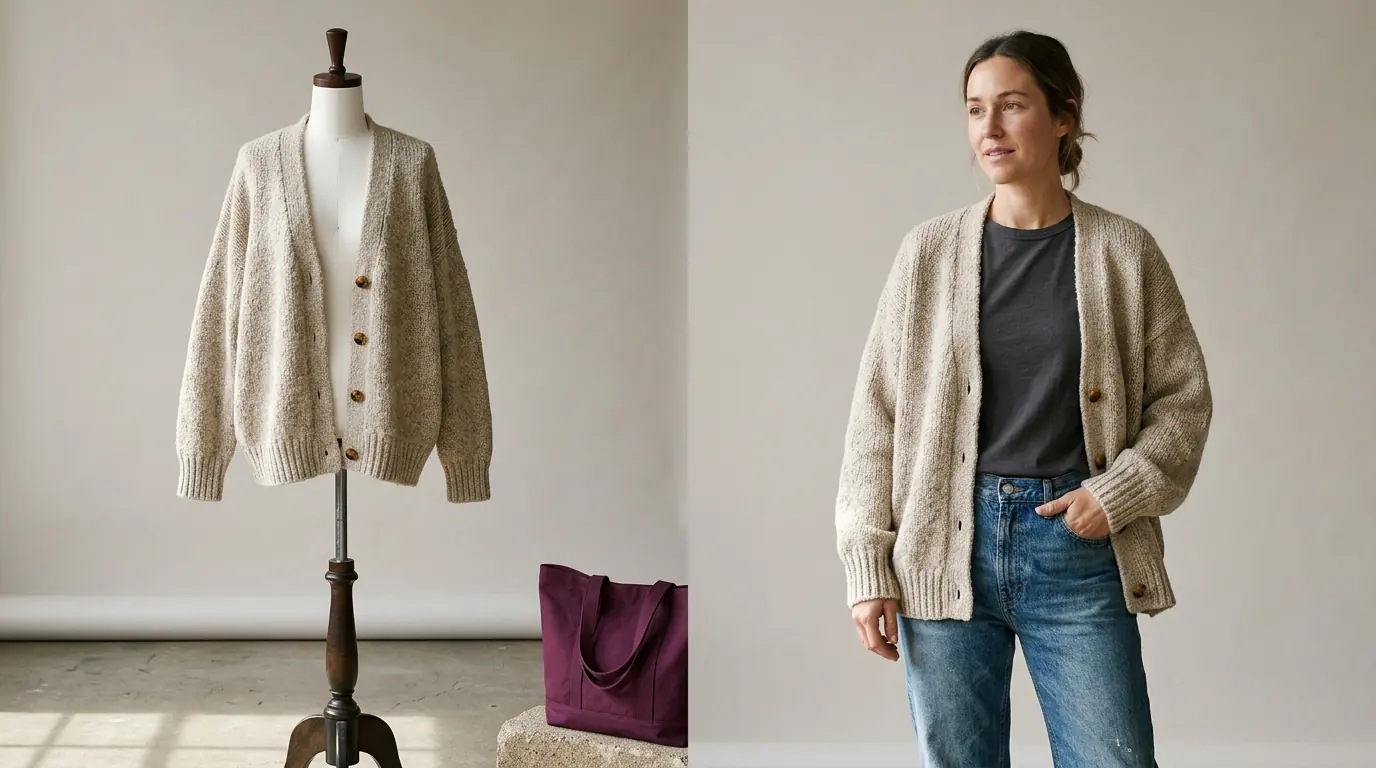
A flat lay is pressed flat, so the tool must invent how the fabric hangs and where shoulders and waist sit; on a mannequin the garment is filled out and the drape is real.
Fit and length still change: the garment is redrawn on a different body and pose, so a dress at the mannequin's knee may end above or below the model's. Check them first.
"Mannequin" also covers two photos: a visible mannequin or dress form, and a ghost mannequin shot with the form edited out; Photta, CatalogX, GreenOnion and Botika name both.
With no mannequin, see AI tools for flat lay to model photos. To keep the hollow garment instead, see AI tools for ghost mannequin photos.
The 13 best AI tools for mannequin to model photos
1. Photoroom: mannequin to model photos from a ghost mannequin shot
Photoroom's AI Fashion Models tool and Virtual Model API take a ghost mannequin shot (or a flat lay or hanger photo) and return the garment on an AI model; you choose model, pose and background.
- What happens to the garment: Generated: the help centre says the image is made "based on the source image, the chosen settings, and a prompt". The API page claims fabric patterns, logos and garment details are kept; keeping your original pixels is not stated.
- Price: Pro $12.99 a month ($89.99 a year), Max $34.99 ($250 a year), Ultra $99 ($990 a year) (US prices; the page shows local prices by country). AI Fashion Models is on Pro and up: about $0.01 a 1K image on Pro, $0.19 at 2K on Max and $0.32 at 4K on Ultra by our arithmetic. The Virtual Model API is on the Plus API plan ($0.10 an image) and Enterprise.
- Free start: A Free plan with 100 exports a month for personal, non-commercial use, without AI Fashion Models. Yearly Pro and Max start with a 7-day trial.
- Not for: Sellers whose photos show a garment on a visible mannequin or dress form; its pages name only the ghost mannequin shot.
2. Photta: mannequin to model photos on a catalogue model, your own model or a model you make
Photta's Mannequin to Model tool takes one clear photo of a garment on a mannequin, a ghost mannequin or a hanger and returns a photo of a model wearing the same garment. The wearer can be a catalogue model, a model built in Model Maker by age, ethnicity, skin tone and hair, or a photo of your own adult model. You choose top, bottom, a set or a one-piece, add a back photo and a close detail if you have them, say how the garment fits and where it ends, pick a background and choose 2K or 4K.
- What happens to the garment: Photta redraws the garment from your photo on the model. Its page says shape, colour and detail are kept, but the result is a new drawing, not your pixels, so compare prints, logos, seams, colour and length with the real product.
- Price: Plans run from $19 to $369 a month, about $0.21 to $0.32 a photo at 2K by our arithmetic. 4K needs the Seller plan or above and costs a little more; Seller is $49 a month. Without a plan, one-time packs of 50 for $12 (about 10 on-model photos) or 100 for $20 never expire.
- Free start: Free to try with no card, enough for 4 on-model photos. Photos made before paying carry a Photta watermark.
- Not for: Sellers who need a pixel-exact cut-out of the garment, or the mannequin removed and the garment left hollow (Photta's separate Ghost Mannequin tool). Nor is it a live try-on for shoppers: that is the separate Photta Business widget, from $49 a month for 500 try-ons.
3. CatalogX: mannequin to model photos from a mannequin or dress form photo
CatalogX's mannequin-to-model page accepts a mannequin or dress form, flat lay or hanger photo; another page adds ghost mannequin shots. You pick a catalogue model or, from Pro, save your own.
- What happens to the garment: Redrawn; an AI reviewer compares each result with your original, and Quality mode re-shoots drift free.
- Price: Starter $9.99 a month for 30 images up to Agency $149.99 for 900: about $0.17 to $0.33 an image.
- Free start: 5 free images on signup, no card. Watermark not stated.
- Not for: Sellers who want their own saved model on the cheapest plan.
4. WearView: mannequin to model photos from a garment on a dress form
WearView's Mannequin to Model page puts any garment photographed on a mannequin or dress form on a realistic model.
- What happens to the garment: Its FAQ says prints, textures, logos and colours are preserved and drape and fit rendered realistically; pricing lists a paid "fix a detail" edit.
- Price: Lite $29 a month, Pro $49, Advanced $99: about $0.59 to $1.74 an on-model photo, monthly, at the page's rate.
- Free start: No free plan listed; the pricing page mentions a 14-day refund on the first plan.
- Not for: Sellers with a small budget per photo.
5. Modelia: mannequin to model photos with a chosen body size
Modelia's Mannequin to Model tool puts clothing shot on mannequins on a human model, whose body size can be set.
- What happens to the garment: Its pages say textures, patterns and design details are retained.
- Price: Creator $30 a month for about 50 standard images, about $0.60 an image ($0.45 with top-up packs).
- Free start: A free Starter plan; its images carry a "Created by Modelia" watermark and have no commercial rights.
- Not for: Sellers relying on its older FAQ, which contradicts newer pages on pose changes and resolution.
6. GreenOnion: mannequin to model photos as a four-image set without prompts
GreenOnion puts the garment from a mannequin or ghost mannequin shot on an AI model, as a four-image set in different poses.
- What happens to the garment: Redrawn; the page says visible details are kept and to check seams, buttons, embroidery and pattern scale.
- Price: Creator $19 a month for 60 images at 2K up to Enterprise $149 for 600: about $0.25 to $0.32 a 2K image, double at 4K.
- Free start: 20 one-time watermarked previews on signup, no card, not downloadable.
- Not for: Sellers who need a downloadable free result.
7. Draph Art: mannequin to model photos with automatic mannequin detection
Draph Art's Mannequin to Model feature detects the mannequin in your photo and converts it to a person, chosen by nationality, gender, age and style.
- What happens to the garment: The page says colour, design and fit are preserved.
- Price: Its pricing data lists Pro $29.99, Pro Plus $49.99 and Omni $99.99; person images start at Pro. Allowances were not readable, so cost per photo is not stated.
- Free start: A sign-up bonus; its size is not stated.
- Not for: Sellers who need the cost per photo before subscribing.
8. Veeton: mannequin to model photos for a whole collection in batch
Veeton accepts flat lay, ghost, hanger and mannequin photos (it recommends ghost or flat lay) and takes a collection in batch.
- What happens to the garment: Redrawn. Its editing page says brands often refine sleeve size, product length and button count afterwards.
- Price: Pro100 $12.99 a month (10 standard images) up to Pro2000 $199.99 (200): about $1.00 to $1.30 an image.
- Free start: A 7-day free trial, enough for 10 on-model images, no card.
- Not for: Sellers who want a low cost per photo.
9. HautechAI: mannequin to model photos paid with one-time packs
HautechAI's web Studio and API convert flat lay or mannequin shots into on-model imagery, its AI models page says.
- What happens to the garment: The page speaks of accuracy-focused garment rendering.
- Price: One-time packs from $10 to $1,200: about $0.46 to $0.77 a photo by the page's approximate photo counts.
- Free start: A "Get started for free" button; the allowance and any watermark are not stated.
- Not for: Sellers who want a per-photo price in writing first.
10. Nightjar: mannequin to model photos from ghost mannequin shots at a low cost
Nightjar turns ghost mannequin photos, flat lays and hanger shots into on-model photos, cast from more than 80 AI models or a custom model.
- What happens to the garment: Redrawn; the page says accuracy depends on your photos and close-ups of prints, small text and hardware help.
- Price: Studio $25 a month for 150 images up to Ultra plans: about $0.13 to $0.17 an image at 2K, double at 4K.
- Free start: Enough for 6 product photos, no card; watermark not mentioned.
- Not for: Sellers whose photos show a visible mannequin; its pages name only the ghost mannequin shot.
11. Uwear.ai: mannequin to model photos with front, side and back views
Uwear.ai has a Studio and an API; its ghost-mannequin-to-model page turns one hollow product shot into front, side and back photos on a model, reusing a saved model across a catalogue.
- What happens to the garment: Redrawn; Uwear's article names six details that go wrong most often, from small lettering and logos, and calls a back view without a back photo a guess.
- Price: No subscription: a balance from $7; a photo costs $0.30 at 1K, $0.50 at 2K or $1.00 at 4K on the default image model.
- Free start: No free plan; paste a store link to get on-model photos of three products by email, no account or card.
- Not for: Sellers whose photos show a visible mannequin, which its pages do not name as input.
12. Claid: mannequin to model photos from a ghost mannequin shot
Claid's clothes-on-models page names an AI "mannequin-to-model conversion", and its AI Fashion Models tool puts flatlays, ghost mannequin images and hanger shots on a library or own model.
- What happens to the garment: Generated: Claid says the output "isn't a pixel-perfect copy-paste" but is anchored on your product.
- Price: Essentials $15 a month ($9 billed yearly), Pro $49 ($35 yearly): about $0.07 to $0.12 a standard image by our arithmetic; 4K needs Pro.
- Free start: A free trial with 50 credits, about 12 fashion images; card and watermark not stated.
- Not for: Sellers whose photos show a physical mannequin or dress form (not a listed self-serve input).
13. Botika: mannequin to model photos from mannequin and ghost mannequin views
Botika's mannequin page takes a front, back or side view of a garment on a mannequin, or a ghost mannequin shot, on a gallery AI model, pose and background. It works best from a smooth, well-lit garment on a simple background, on every plan.
- What happens to the garment: The page says you "keep every garment detail intact"; its explainer says an image model draws the result, anchored on the product photo.
- Price: Personal $25 a month (840 credits), Pro $60 (2,200), Max $100 (4,000), 20% less yearly. A Standard 2K photo uses 30 credits: about $0.75 to $0.89 on monthly plans.
- Free start: A 7-day trial with 300 credits (about 10 Standard photos) per its pricing page; its FAQ gives smaller figures and mentions watermarks.
- Not for: Sellers who want to set the model's body type here; the page says body types are "coming soon".
How to check mannequin to model photos before you publish
| Check | What to look for |
|---|---|
| Length | Hem and sleeves end where they do on a real person |
| Fit | Not tighter or looser; no pins or clips drawn in |
| Colour and trims | Shade matches; same number of buttons, zips and pockets |
| Mannequin leftovers | No stand, neck cap or joint showing |
Which AI tool for mannequin to model photos fits your shop
- You want a free start with no card: use Photta or CatalogX.
- Your garments are on a dress form: use CatalogX or WearView.
- You want your own model or one saved face: use Photta, or CatalogX from Pro.
- You want the lowest listed cost from ghost mannequin shots: use Photoroom at 1K, Claid at standard quality or Nightjar at 2K.
FAQ: AI tools for mannequin to model photos
What is the best AI tool for mannequin to model photos?
It depends on the photo you have. Photoroom works from a ghost mannequin shot from $12.99 a month, and Photta takes either kind of mannequin photo at about $0.21 to $0.32 a photo. CatalogX and WearView name dress form photos; Nightjar, Uwear.ai and Claid work from ghost mannequin shots.
Can AI make mannequin to model photos without a reshoot?
Yes. Photta, CatalogX, WearView, Modelia, GreenOnion, Draph Art, Veeton, HautechAI and Botika say on their own pages that they accept a photo of a garment on a mannequin. Each redraws the garment, so compare the result with the real product.
How much do mannequin to model photos cost?
By our arithmetic from listed plan prices, about $0.01 to $1.74 a photo. Photoroom is about $0.01 at 1K on Pro, Nightjar about $0.13 to $0.17, CatalogX $0.17 to $0.33, Photta about $0.21 to $0.32 and WearView $0.59 to $1.74.
Will AI change the fit or length of the garment in a mannequin to model photo?
It can, because hem and sleeves are placed again on the model's body. Veeton says brands often refine sleeve size and length afterwards, and Photta lets you say how the garment fits and where it ends.
Which AI tools for mannequin to model photos can I try for free?
Photta is free to try with no card, enough for 4 watermarked on-model photos. CatalogX gives 5 free images, Nightjar 6 and Veeton a 7-day trial with 10 images, all with no card.
Sources for this comparison of mannequin to model photos tools
- Photta: llms.txt and the pricing page, read on 18 November 2026; the Mannequin to Model and AI Fashion Model Generator pages, read on 15 November 2026.
- CatalogX, WearView, Modelia, GreenOnion, Draph Art, Veeton, HautechAI, Nightjar and Uwear.ai: feature, FAQ, article and pricing pages, read on 15 November 2026.
- Read on 18 November 2026: Photoroom (Virtual Try-On, Virtual Model API, pricing and API pricing pages, four help articles), Botika (pricing, FAQ, mannequin photography page, one guide) and Claid (clothes-on-models, fashion, flatlay-to-model and pricing pages).
- Cost per photo is our own arithmetic from listed plan prices (plan price divided by its images).
Profiles of the tools in this list
- Photoroom : pricing, free start and the 34 lists it appears in. Photoroom alternatives
- Photta : pricing, free start and the 36 lists it appears in. Photta alternatives
- CatalogX : pricing, free start and the 14 lists it appears in. CatalogX alternatives
- WearView : pricing, free start and the 12 lists it appears in. WearView alternatives
- Modelia : pricing, free start and the 13 lists it appears in. Modelia alternatives
- GreenOnion : pricing, free start and the 6 lists it appears in. GreenOnion alternatives
- Draph Art : pricing, free start and the list it appears in. Draph Art alternatives
- Veeton : pricing, free start and the 4 lists it appears in. Veeton alternatives
- HautechAI : pricing, free start and the 4 lists it appears in. HautechAI alternatives
- Nightjar : pricing, free start and the 14 lists it appears in. Nightjar alternatives
- Uwear : pricing, free start and the 10 lists it appears in. Uwear alternatives
- Claid : pricing, free start and the 18 lists it appears in. Claid alternatives
- Botika : pricing, free start and the 15 lists it appears in. Botika alternatives
Categories: On-model photos